




Table of Contents
Introduction
Salesforce is the system of record for leads, contacts, opportunities, and campaign data. Yet when it comes to email marketing, many organizations still rely on external platforms that require data sync, field mapping, and constant integration maintenance.

Over time, this creates friction. Lists drift. Reporting fragments. Personalization lags behind CRM updates. That is where the concept of a Salesforce native email app becomes important.
Instead of connecting to Salesforce, a native solution runs inside it. No duplicate databases, API dependency for segmentation, and no split reporting environments. Just Salesforce-first email marketing aligned with real-time CRM data.
In this guide, we’ll break down what a Salesforce native email app actually means, how it differs from traditional integrations, the risks of disconnected systems, and what to look for when evaluating the right solution for your organization.
Core capabilities of a Salesforce native email app
When evaluating a Salesforce native email app, it helps to move beyond feature lists and understand how each capability supports a CRM-first architecture. A truly native solution is not simply connected to Salesforce. It operates within the platform, uses live CRM data, and strengthens Salesforce as the single source of truth.
Below are the core capabilities that define a genuine native email solution that Salesforce teams can rely on.
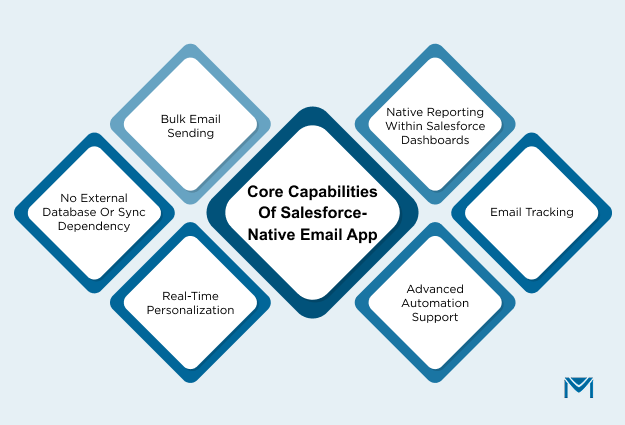
1. Bulk email sending
A native email app must allow teams to send campaigns directly from Salesforce objects. This includes Leads, Contacts, Campaign Members, and in many cases, related records.
Marketing teams can segment audiences using standard Salesforce reports or list views. Sales teams can trigger communication directly from account records. There is no need to export lists, upload CSV files, or reconcile subscriber counts between systems.
This capability becomes critical when organizations want to send unlimited emails from Salesforce without relying on external platforms to bypass Salesforce email limits. Keeping campaign execution inside the CRM reduces workflow friction and improves data accuracy.
2. Real-time personalization
Native apps pull live data directly from Salesforce fields at the moment of send. That includes both standard fields and custom objects.
For organizations with complex data models, this is not optional. Event registrations, subscriptions, contract renewals, or account hierarchies often live in custom objects. A native app should allow personalization based on those relationships without complex field mapping or sync configurations.
When personalization depends on external sync, there is always a lag. Real-time access ensures that the message reflects the most current CRM state, whether that is opportunity stage, owner change, or consent status.
Vulcan Value Partners, a boutique investment management firm, needed to send high-volume communications while preserving individualized messaging.
MassMailer enabled them to customize emails so they appeared to come directly from individual relationship managers while leveraging Salesforce list management and segmentation.
That combination of scale and personalization is only possible when the email app operates natively inside Salesforce and pulls live CRM data at send time, not from a replicated external list.
3. Native reporting within Salesforce dashboards
Reporting is where architecture becomes visible to leadership. A Salesforce native email app should allow engagement metrics such as opens, clicks, bounces, and unsubscribes to be analyzed directly within Salesforce dashboards.
This supports unified pipeline visibility. Revenue operations teams can correlate campaign engagement with opportunity progression without logging into a second reporting system.
If reporting lives outside Salesforce and only partial data syncs back, decision-making becomes fragmented. Native reporting strengthens data integrity and aligns email performance with CRM analytics.
4. Advanced automation support
Modern Salesforce environments rely on Flow and automation to manage lead routing, lifecycle changes, and customer communication. A native email app should integrate directly with these tools.
For example, when a Lead status changes to Qualified, Salesforce Flow should be able to trigger an email sequence without external workflow builders. When an Opportunity closes, an automated follow-up can be sent using the same CRM logic that governs the sales process.
Automation that operates inside Salesforce eliminates the need for duplicate logic in external marketing systems. It simplifies governance and reduces the risk of inconsistent triggers.
5. Email tracking
Visibility into engagement is critical for sales and marketing alignment. A Salesforce native email app should log engagement events directly into Salesforce email activity history.
When a sales representative opens a Contact record, they should see whether the recipient opened the email, clicked a link, or bounced. This enables timely follow-up and reduces reliance on manual communication tracking.
If engagement data lives externally, teams must either log into another platform or rely on partial sync back to Salesforce. Native logging keeps context centralized and actionable.
6. No external database or sync dependency
The defining characteristic of a Salesforce native email app is the absence of external data storage and sync reliance. Engagement data, segmentation, and personalization should operate within Salesforce infrastructure.
When email tools depend on replicated databases, API synchronization, or middleware layers, they reintroduce the very integration challenges native solutions aim to solve.
A native architecture eliminates sync issues, reduces integration maintenance, and strengthens Salesforce as the authoritative system for customer communication. That structural clarity is what distinguishes a true native email solution Salesforce organizations can trust from a connected but external email integration.
Challenges with third-party tools or integrations of Salesforce
Many teams start with an external email platform because it feels like the quickest path to scaling email marketing. You connect it to Salesforce via API, sync contacts, and launch campaigns.
On paper, it works. In practice, it often creates a second system of record for customer communication, and the operational trade-offs show up fast.
Here are the challenges that come up most often when a Salesforce email program depends on third-party tools or integration-heavy setups.
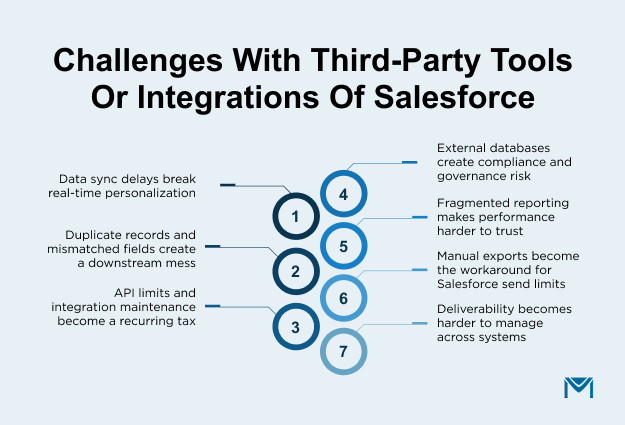
1. Data sync delays break real-time personalization
When your email tool lives outside Salesforce, personalization depends on how frequently data syncs. That sounds minor until you look at how often Salesforce data changes.
Lead status updates, opportunity stage movement, ownership changes, updated consent fields, and campaign membership edits can happen all day.
If the sync runs every few hours, you risk sending messaging that is out of date. A lead that just converted might still receive top-of-funnel nurture. An account that was flagged as “do not email” might not reflect quickly enough.
You can try to fix this with more frequent syncs, but that increases API usage and creates more integration dependencies.
More frequent sync jobs increase the chances of failure or throttling. Now your marketing performance depends on whether your connector is functioning properly.
MassMailer eliminates this dependency because it operates entirely inside Salesforce. There is no external database replicating your Leads or Contacts. Segmentation uses live Salesforce reports and list views. Personalization fields pull directly from standard and custom objects at the moment of send.
When a Lead status changes, the update is immediately reflected because the email engine runs within Salesforce itself. There is no lag window, no background sync, and no duplicate contact table that must be reconciled.
Instead of managing sync frequency, teams can focus on messaging and performance. That is the operational advantage of using a Salesforce native email app like MassMailer rather than relying on third-party integrations.
2. Duplicate records and mismatched fields create a downstream mess
Even when email integrations are configured correctly, duplicate records often creep in over time. This usually happens because the external email platform uses a different primary identifier than Salesforce, stores its own version of contact data, or creates new records instead of updating existing ones during sync.
Over time, this creates reporting inconsistencies. Campaign performance looks different depending on where you measure it. Attribution discussions become debates about which system is “right” instead of discussions about optimization.
According to Forrester’s Data Culture And Literacy Survey, 2023, organizations lose an average of $5 million annually due to poor data quality, with 7% reporting losses of $25 million or more.
Duplicate records, mismatched identifiers, and fragmented systems are some of the most common contributors to that loss. When CRM data and email engagement data diverge, trust erodes quickly.
This is where a Salesforce native email app like MassMailer changes the equation.
Because MassMailer operates entirely inside Salesforce, there is no external contact database. Emails are sent directly from Salesforce objects such as Leads, Contacts, Campaign Members, and custom objects. Segmentation uses live CRM data, not replicated lists.
MassMailer further strengthens data integrity with built-in email verification. Instead of exporting contacts to a separate tool for validation, verification happens directly within Salesforce.
Invalid, risky, or duplicate email addresses can be identified in real time or in bulk across any object. This keeps list hygiene aligned with the CRM rather than creating another external dataset that must be managed.
3. API limits and integration maintenance become a recurring tax
Integrations require ongoing monitoring, periodic troubleshooting, and coordination between marketing ops, Salesforce admins, and sometimes security teams.
Two things usually drive the maintenance load:
- API consumption and throttling. As sync frequency increases or as you add more objects, API usage grows. This can lead to delays or failures that are not obvious until the data looks wrong in a campaign audience.
- Change management. Field updates, automation changes, new validation rules, and package upgrades in Salesforce can create unexpected integration breaks.
4. External databases create compliance and governance risk
When email execution happens outside Salesforce, the email platform typically stores some combination of contacts, segments, engagement events, suppression lists, and sometimes message content. Now your customer communication data is spread across systems.
That introduces governance questions that are hard to ignore:
- Where is customer email engagement data stored?
- Who has access to it, and how is it audited?
- How do retention, deletion, and consent policies apply across systems?
- What happens when legal asks for proof of consent, and the truth is split between Salesforce and the email tool?
Even if your org handles this well, it is still an additional risk surface area. A Salesforce-first email marketing approach reduces the number of places sensitive communication data lives, which simplifies audits and access control.
5. Fragmented reporting makes performance harder to trust
In most organizations, pipeline, revenue attribution, and campaign influence are analyzed inside Salesforce. That is where leadership reviews dashboards, forecasts are built, and opportunity data lives.
At the same time, engagement metrics such as opens, clicks, complaints, and unsubscribes are often reviewed in a separate email platform.
When reporting is split across systems, confidence erodes. Marketing may report strong engagement from the email tool, while sales questions why those signals are not visible inside the CRM.
This fragmentation also affects execution. If a sales representative cannot see email engagement directly within a Lead or Contact record, follow-up becomes inconsistent.
They may not know whether a prospect opened an email, clicked a pricing link, or ignored the message entirely. That delay impacts timing and personalization.
A Salesforce native email app addresses this structural issue by keeping engagement data inside the CRM. With MassMailer, opens, clicks, bounces, and unsubscribes are logged directly in Salesforce activity history.
Reporting remains native to Salesforce dashboards, allowing teams to combine campaign engagement with pipeline metrics in one place.
Teams can track performance across Campaign Members, Leads, and custom objects without exporting engagement data to external tools. The result is a unified reporting environment where CRM and email marketing operate as one system rather than parallel systems competing for accuracy.
6. Manual exports become the workaround for Salesforce send limits
Even teams that want to “stay in Salesforce” often hit sending constraints and end up exporting lists to external platforms just to get campaigns out.
Salesforce documents a daily limit for mass email and list email sends to external addresses, and those limits are a common driver for tool sprawl when a team needs higher-volume outreach.
Once exports become normal, other issues such as version control problems, outdated lists, manual suppression management, and a higher risk of emailing the wrong segment follow.
7. Deliverability becomes harder to manage across systems
Deliverability is often misunderstood as a content issue. In reality, it is a systems issue. Authentication protocols such as SPF, DKIM, and DMARC must be configured correctly. Complaint rates must be monitored. Suppression lists must be enforced consistently. IP and domain reputation must be protected over time.
When email sending is spread across multiple tools, these controls become fragmented.
One team may send transactional messages from one system. Marketing campaigns may go out from another platform. Sales may rely on a separate outreach tool.
Each system has its own sending infrastructure, its own suppression rules, and its own reporting interface. That makes it difficult to maintain consistent authentication standards and reputation monitoring.
In a disconnected setup, warning signs are easy to miss. A spike in hard bounces might appear in one platform but not in Salesforce.
A domain authentication misconfiguration might live in a separate dashboard that marketing rarely checks. Reputation damage can accumulate quietly until open rates decline or emails start landing in spam.
A Salesforce native email app like MassMailer addresses this structural challenge by centralizing deliverability management inside Salesforce.
MassMailer Email Monitor provides built-in sender reputation analysis, authentication checks, and compliance diagnostics.
Instead of relying on separate deliverability tools, teams can evaluate SPF, DKIM, and DMARC configurations directly in context with their campaigns. IP and domain reputation signals are monitored in a single environment, reducing the risk of blind spots.
Content analysis tools further strengthen deliverability. Emails can be reviewed for formatting issues, spam-trigger words, and structural risks before being sent. This proactive approach supports higher inbox placement and reduces the risk of domain penalties.
Our guide on 10 Best Salesforce Apps to Supercharge Your CRM in 2026 breaks down high-impact native and integrated solutions across marketing, sales, automation, and reporting so you can make architecture-aligned decisions.
MassMailer: Salesforce-native email app
MassMailer is a Salesforce native email app built entirely within the Salesforce platform. It does not rely on external databases, middleware, or background synchronization. It keeps CRM data, email execution, and reporting inside the same system.
Additionally, MassMailer extends sending capabilities so organizations can scale outreach without exporting data. For marketing teams running large campaigns and sales teams executing account-based outreach, this removes a recurring operational bottleneck.
Key features of MassMailer:
1. Real-time CRM data and segmentation
MassMailer operates without a secondary contact database, which preserves Salesforce as the single source of truth.
Segmentation is built using Salesforce reports and list views, and personalization pulls directly from standard and custom fields in real time. This ensures campaigns reflect the latest CRM updates at the moment of send.
2. Built-in email verification and list hygiene
MassMailer integrates email verification directly within Salesforce. Invalid, risky, or disposable email addresses can be identified before sending, reducing hard bounces and protecting domain reputation. With inbox providers enforcing stricter sender requirements, proactive list hygiene is essential for consistent inbox placement.
This focus on clean data is not just a technical best practice. According to Salesforce’s State of Data & Analytics Report 2025, 74% of sales teams now prioritize data hygiene as a key driver for accurate customer engagement.
When contact data is outdated or inaccurate, personalization suffers, follow-ups miss their mark, and reporting becomes unreliable.
By verifying emails directly inside Salesforce, MassMailer ensures that list hygiene stays aligned with CRM records. There is no need to export lists or maintain a separate validation process. The result is cleaner segmentation, fewer bounce-related reputation risks, and engagement metrics that reflect real audience behavior rather than database noise.
3. Sender reputation and authentication monitoring
Through Email Monitor, MassMailer centralizes deliverability oversight inside Salesforce. Teams can evaluate SPF, DKIM, and DMARC configurations alongside campaign performance. Content analysis tools help identify potential spam triggers before sending, reducing the risk of deliverability issues and domain penalties.
If you are actively reviewing authentication setup or noticing inconsistent inbox placement, it is worth stepping back and aligning your broader Salesforce email deliverability strategy.
4. Salesforce-native automation and reporting
Drip campaigns and triggered emails can be automated using Salesforce Flow or Process Builder.
Engagement metrics such as opens, clicks, bounces, and unsubscribes are logged directly in CRM activity history. Reporting remains within Salesforce dashboards, enabling unified analysis of campaign and pipeline performance.
5. Drag-and-drop email template builder
MassMailer includes a visual email builder inside Salesforce, allowing users to create responsive templates without coding. This supports consistent branding while keeping content creation within the CRM environment.
6. One-off email sending with tracking
Users can send individual emails directly from Lead or Contact records and track engagement in Salesforce. This is useful for sales outreach and follow-ups that require visibility within CRM activity history.
7. Direct attachment sending from Salesforce
Marketing and sales teams can attach documents, PDFs, or other files directly from Salesforce records. This removes the need for external file-sharing links and keeps communication history centralized.
8. Spam trap detection and suppression controls
MassMailer helps identify potential spam traps and enforce suppression rules within Salesforce. This reduces the risk of blacklisting and supports long-term sender reputation management without relying on external deliverability tools.
Conclusion
Choosing between a third-party integration and a Salesforce native email app is ultimately an architectural decision.
If Salesforce is your system of record, every additional platform introduces complexity. Sync delays affect personalization. External databases complicate compliance. Fragmented reporting slows strategic decisions.
A native email solution that Salesforce teams can rely on eliminates those friction points. It keeps data in one place, enables real-time personalization, and aligns deliverability monitoring with CRM governance.
A Salesforce-first email marketing approach simplifies operations and supports long-term scalability.
For organizations that want unlimited sending, strong deliverability controls, and unified CRM reporting, a Salesforce-native email app like MassMailer offers a structured and scalable path forward. Book a demo today.
Frequently Asked Questions
1. Is Salesforce Marketing Cloud considered a Salesforce native email app?
2. Can a Salesforce native email app work with custom objects?
3. Do Salesforce native email apps require API integrations?
4. Can a Salesforce native email app replace external email marketing platforms?
5. Does a Salesforce native email app require data migration?
6. Can a Salesforce native email app replace external ESPs?
Start Your Free Trial Today
Experience MassMailer the easiest way to send personalized emails from Salesforce.
Related Blogs

How to Integrate SendGrid with Salesforce for Better Email Automation
The Complete Guide on ConvertKit Salesforce Integration




MassMailer Glossary
About the Author

Siva Devaki 

Siva Devaki is the founder of MassMailer Inc., a tool that helps Salesforce users optimize email marketing. A passionate advocate for email marketing, Siva writes and hosts podcasts on the topic, sharing insights to help businesses drive revenue and enhance customer engagement through Salesforce email automation and tracking.